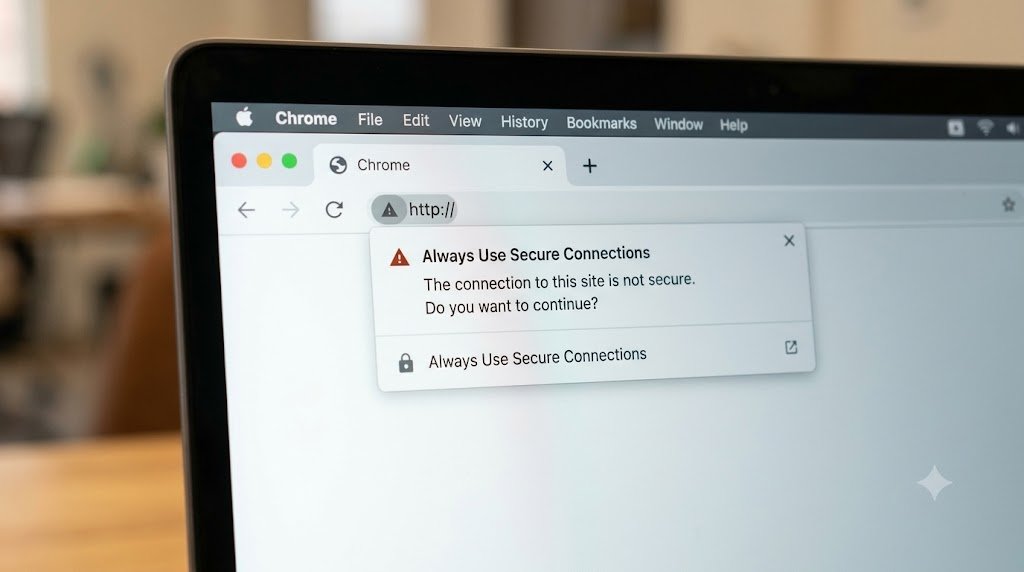
Discover how the new Chrome HTTPS protection safeguards users from insecure websites, what the security warnings mean, and how webmasters must adapt.
Google Chrome is modifying its approach to handling websites without secure HTTPS protocols. On October 21, 2026, the security team of Google’s Chrome released a statement saying that the browser now requests user permission before loading some websites through unsecured HTTP protocol.
Previously, there would be a small message stating that the website was not secure. However, now Chrome will warn people before they even get an insecure connection to the site.
This is significant for regular users of the Internet, website owners and companies. Knowing how HTTPS works will allow individuals to notice any threats to their security.
What Changed in Google Chrome?
Google has expanded its Always Use Secure Connections protection so that warnings for insecure HTTP connections are enabled by default.
The feature was previously available to users enrolled in Chrome’s Enhanced Protection mode. Google has now extended this approach more broadly.
If one tries to access a site which cannot support HTTPS protocol, Chrome will prompt the user to proceed further with caution. This gives users a chance to have second thoughts regarding their intentions of browsing an insecure website.
It does not imply that all HTTP sites are inherently malicious but simply that such connections are lacking in some of the security elements found in HTTPS.
What Is HTTPS and Why Does It Matter?
HTTPS stands for Hypertext Transfer Protocol Secure. It is the secure version of the protocol used by browsers and websites to exchange information.
When a website uses HTTPS correctly, the connection is encrypted. This helps protect information against interception or modification by parties monitoring the network.
For instance, in case one uses public Wi-Fi while visiting a website that does not use encryption, he or she is likely to face extra dangers. HTTPS ensures the protection of the information sent and received through the web browser and the website.
It is crucial for account login details, transaction details, private information and many other sensitive details.
How Is HTTP Different From HTTPS?
HTTP transfers information without the transport encryption provided by HTTPS. This can allow someone with suitable network access to observe or interfere with information moving between a user and a website.
The HTTPS protocol makes use of the TLS encryption protocol to provide security for the connection. Additionally, the protocol assists in ensuring that the browser is talking to the right website depending on how secure the trust mechanism is.
Nevertheless, even though the website is using an HTTPS protocol, it does not guarantee that it is legitimate, and a phishing website can make use of an SSL certificate.
How Does the New Warning Work?
Chrome’s new protection asks users to approve certain insecure connections before they are opened.
Google explains that after a user approves HTTP access to a particular site, Chrome generally avoids repeating the warning until the site has not been visited for at least two weeks.
There are also exceptions made for some local addresses and network environments. In this case, there might be some webpages related to home routers that have local IP addresses and do not get the default warning.
This is done to accommodate cases where normal HTTPS certificates cannot be used.
Will This Interrupt Everyday Browsing?
For most people, Google expects little disruption because HTTPS is already widely used.
The company reports that nearly 95% of desktop Chrome users in its early rollout data did not encounter an HTTP warning during a given week.
It means that the effect of this update is going to be visible mostly when accessing old websites or online services which do not have current protection for connections.
When a warning pops up, it needs to be considered whether there is an alternative which is more secure for accessing the same website.
What Should Website Owners Do?
The administrators of websites need to ensure that their sites use HTTPS and that visitors are directed to secure pages.
The need will arise to check whether their image, script, or form connections are secure or insecure (HTTP).
This may involve checking the host settings, SSL/TLS certificate, WordPress URLs settings, and even the plugins of the WordPress website.
However, a valid certificate is not enough to ensure website security. There are other steps such as making sure the software is updated and the administrator password is secured.
Our article on cybersecurity trends in 2026 explains why secure configuration, software maintenance, and access controls remain important for businesses.
What Should Users Do When They See the Warning?
It would be wise for the users to confirm if the web address is correct. It is better if the user does not continue if the site is unknown or requests personal data because it is better to be safe.
If the website is from a reputable company, then the user may ask about the insecure connection or look for an HTTPS address.
The most crucial part is to ensure that no passwords, banking details or any personal information is entered on an insecure link.
Conclusion
Chrome’s latest security change reflects the growing expectation that websites should protect connections by default. By warning users before certain insecure connections are established, the browser provides an additional opportunity to avoid unnecessary exposure.
For everyday users, the lesson is to pay attention to security warnings and avoid entering sensitive information on insecure websites. For website owners, the update reinforces the importance of properly configured HTTPS, current software, and ongoing security maintenance.
Frequently Asked Questions
1. Is HTTP always dangerous?
Not every HTTP website is malicious, but HTTP lacks the encryption protections provided by HTTPS.
2. Does HTTPS guarantee that a website is safe?
No. HTTPS protects the connection, but fraudulent websites can also use encryption.
3. Will Chrome block all HTTP websites?
No. Chrome may ask users for permission before proceeding, and some exceptions apply.
4. Why is Google introducing this protection?
The company wants to reduce exposure to interception, malicious content injection, and other risks associated with insecure connections.
5. Should website owners move to HTTPS?
Yes. Public websites should use properly configured HTTPS, particularly when handling user information.