Adobe Analytics Update brings improvements to customer journey reporting, data access controls, and analytics workflows. Explore what businesses should know.
Firms use website analytics to determine how their customers find out about their products, how they engage with the content, and how they take certain actions. However, just obtaining information is not all that is needed. Firms also require proper reporting, proper comparisons, and proper access control for their information.
The most recent version of Adobe Analytics comes with upgrades that should improve both reporting and access control management for information. Some of the upgrades that were highlighted in the October 2026 release notes of the firm include improvements in permission control in the firm’s MCP server, improved customer journey comparisons, and improvements in classification data in Data Warehouse reports.
The improvements will be helpful for marketing groups, business analysts, e-commerce businesses, and organizations making decisions on the basis of data. This will enable businesses to identify which improvements can be helpful for them.
What Is Adobe Analytics?
Adobe Analytics is a digital analytics software which assists companies in analyzing how people interact with their websites, applications, and other digital experiences. Companies can leverage the software in analyzing user behaviors, measuring marketing success and exploring areas where improvements in customer experience can be made.
As an example, an online business may be interested in finding out how many users have visited a certain product, put it in the cart and bought it eventually. The mentioned process can be analyzed by Adobe Analytics in order to discover where the prospects drop off.
It is created especially for organizations which need detailed reporting and analysis of various activities done by their clients. It will work properly if it is implemented correctly and data is defined properly.
What’s New in the Adobe Analytics Update?
October release notes for Adobe provide information about updates to permissions, journey analytics, and reporting. Not all features mentioned in the release notes are fully launched or available, some require a phased rollout or will be available at a later date.
This is an important point to understand since mentioning a particular feature in the release notes does not necessarily mean that everyone can start using it right away.
New Read-Only Permissions for Analytics Tools
One notable change is the introduction of a read-only permission for the Adobe Analytics MCP server. Adobe lists this permission as generally available from October 6, 2026.
An MCP server provides a structured way for compatible applications and tools to interact with supported services. In this case, the permission system helps administrators control what connected users or tools are allowed to do.
Prior to now, there has been a requirement for organizations utilizing the MCP Integration to take into account wider access when integrating their tools with Analytics. This new permission gives administrators the opportunity to give read-only permissions to those who cannot create or modify some of the components within the analytics suite.
For instance, a reporting assistant may be required to access information for analytical purposes without modifying the organization’s segments and calculated metrics.
Why Do Read-Only Permissions Matter?
Access management is an important part of data governance. Employees and applications should receive the permissions necessary for their responsibilities, rather than unrestricted access to every function.
The marketing analyst might have to review some reports, but will not be able to change reporting definitions common for all users. In the same manner, the external consultant might have to get access to selected analytical data without any possibility to modify any critical components.
Access control with read-only restrictions will help enterprises avoid any accidental modifications. Yet, the administrators should think about what information the linked tool should see.
This approach is called the least privilege principle. It is used for analytics tools, cloud computing, databases, and other software packages.
Better Customer Journey Comparisons
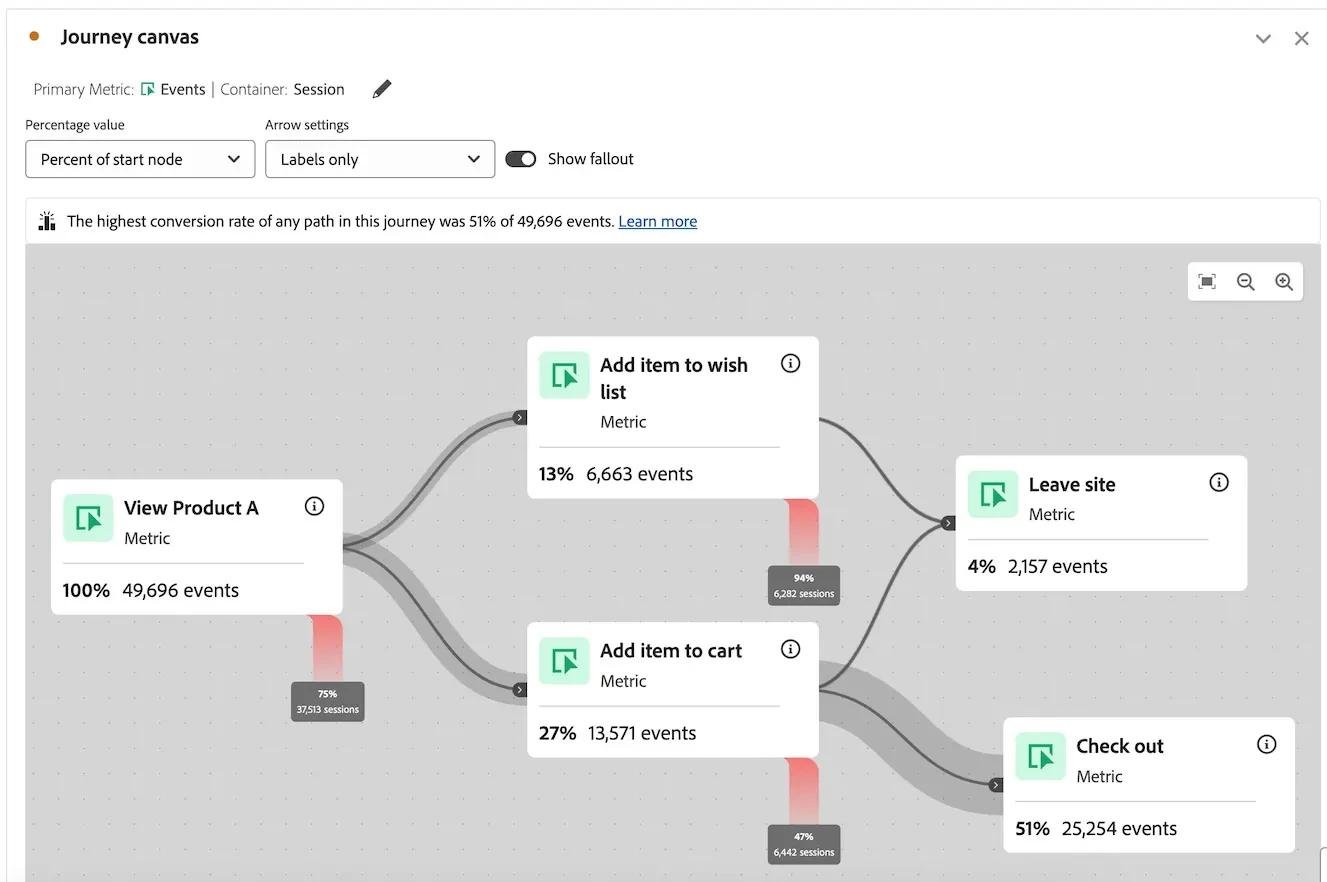
Adobe also introduced a new comparison option for its Journey canvas visualization, with general availability listed as October 19, 2026.
Customer journey analysis examines the steps people take while interacting with a business. These steps might include visiting a website, viewing product information, starting registration, or completing a transaction.
Compare percentages is the latest feature that enables users to compare the percentage points between a journey and a previous time period.
It is essential because there is a difference between percentage points and percentages. A growth in the conversion rate from 20 percent to 25 percent shows a growth of five percentage points, despite the percentage increase being 25 percent.
Comparing percentage points may be helpful when comparing retention and fallout rates when the number of people joining a journey varies between two periods.
How Can Businesses Use Journey Comparisons?
Imagine an online store evaluating its checkout experience. During one period, 40% of customers who begin checkout complete a purchase. During another period, that figure increases to 46%.
This is a way that the business could characterize the change, as an increase by six percentage points.
A further analysis could be performed to find out whether the increase was caused by changes in the shipping data, payment methods, web site design, or something else within the check-out process.
The comparison in itself is not sufficient for establishing causation because it cannot differentiate real effects from seasonal variations or changes in consumer behavior.
Improvements to Data Warehouse Classification Reporting
Adobe’s October release notes also describe improvements to classification data in Data Warehouse reports. The rollout began on October 14, with general availability scheduled for January 2027.
Classifications help organizations group or describe analytics values. For example, a company might classify individual product identifiers into broader product categories to make reporting easier.
According to Adobe, the modifications will enhance the representation of classification information in Data Warehouse outputs. In certain instances, reports could generate blank values where deleted classifications previously appeared.
In other instances, more comprehensive classification information could be produced compared to previous reports. While these modifications might enhance the accuracy of the reports, they will also lead to inconsistencies in reports from the new generation and the previous exports.
Organizations should thus examine the definition of their reports prior to assuming any customer behavior changes.
What Does This Mean for Marketing Teams?
Marketing teams often use analytics to evaluate campaign performance, website engagement, and customer conversion.
Comparative journey data will allow them to more effectively communicate changes, especially where audiences or traffic levels are different during each period.
Better classification data will also lead to better presentation of information about campaigns, products, or customers within reports.
But for good analysis, consistent definitions are needed. A report that shows improved conversions does not automatically mean that the marketing campaign was responsible for the improvements.
Teams should combine analytics findings with business context, testing, and other evidence before making major decisions.
What Does This Mean for Business Analysts?
Business analysts may benefit from clearer reporting and more controlled access to analytical tools.
Read only access can facilitate processes where the user requires data retrieval but not any modification of common modules. Comparing journeys can help in making performance differences easier to understand for people outside the field.
For instance, an analyst giving presentation to the management about the customer retention performance can use absolute percentage change instead of relative percentages.
Organizations interested in improving their broader reporting capabilities can also explore our guide on creating a Power BI dashboard from Excel, which introduces another approach to visualizing business information.
Are These Features Available to Everyone?
It is not always the case. Adobe employs the model of continuous delivery, so some features may be added gradually and will have different general availability dates.
The read-only MCP permission and journey comparison are generally available in October. The classification improvements have a longer rollout plan.
It is necessary for the companies to check the release notes and learn about the availability of each capability in their environment.
They should also consider whether additional configuration or administrator permissions are required.
Conclusion
Adobe’s October Analytics release focuses on practical improvements to reporting, customer journey analysis, and data access controls. These changes may help organizations produce clearer comparisons, reduce unnecessary modification permissions, and improve the consistency of analytical information.
The most valuable outcome is not simply having more features. It is being able to understand business performance more accurately and share findings with the people responsible for making decisions.
Organizations should review the available capabilities, check their reporting configurations, and adopt the improvements that address genuine analytical needs.
Frequently Asked Questions
1. What changed in Adobe Analytics?
The October release includes read-only MCP server permissions, percentage-point comparisons in Journey canvas, and improvements to classification reporting.
2. What is a customer journey?
A customer journey describes the sequence of interactions a person has with a business, such as visiting a website, viewing products, and completing a purchase.
3. What is a percentage-point change?
It is the arithmetic difference between two percentages. For example, a change from 30% to 35% is five percentage points.
4. Why are read-only permissions useful?
They allow authorized users or connected tools to retrieve supported information without granting broader modification permissions.
5. Are all the new features available immediately?
No. Adobe lists different rollout and availability dates, so organizations should confirm access through their own environment.